
Remix lab: deploy your first contract
Sepolia only
Everything here uses free Sepolia test assets with no monetary value. Never deploy an Academy exercise to mainnet, and never connect a wallet holding real funds.
Today you put a program on a blockchain. It will have its own address, anyone can call it, and it remains publicly queryable while Sepolia and its history are maintained.
Use AI as a tutor, not an autopilot
During the walkthrough, it is fine to paste a compiler error into an AI assistant, ask what one line does, compare the expected state before and after a transaction, or ask for help when Remix's wording differs. Keep the provided Guestbook as the canonical path: AI supports the loop of understanding, testing and inspecting; it does not replace understanding.
This is your Anchor Mission evidence
Keep the contract address, the deployment transaction hash, and your write transaction hash. You will need all three.
Learning objectives
- Compile and deploy a Solidity contract to Sepolia
- Call a read function and a write function, and explain the difference in cost
- Find your contract on a block explorer and read its transactions
- Explain what an event looks like from the outside
Before you start
You need three things
- Your Academy wallet from Week 1 Part 7, on Sepolia
- Test ETH in it — deploying costs more gas than a transfer, so top up from a faucet if your balance is low
- A desktop browser. Remix does not work well on mobile
Nothing is installed. Remix runs entirely in a browser tab.
Guided walkthrough
Open Remix
Go to remix.ethereum.org — use your Week 0 bookmark.
Check the URL
Fake IDE and wallet sites are a routine attack. You will connect a wallet to this page, so the URL matters.
The interface has three columns: a file tree on the left, the editor in the middle, and plugin icons down the far left edge. You should see a default workspace with some sample contracts already in it.
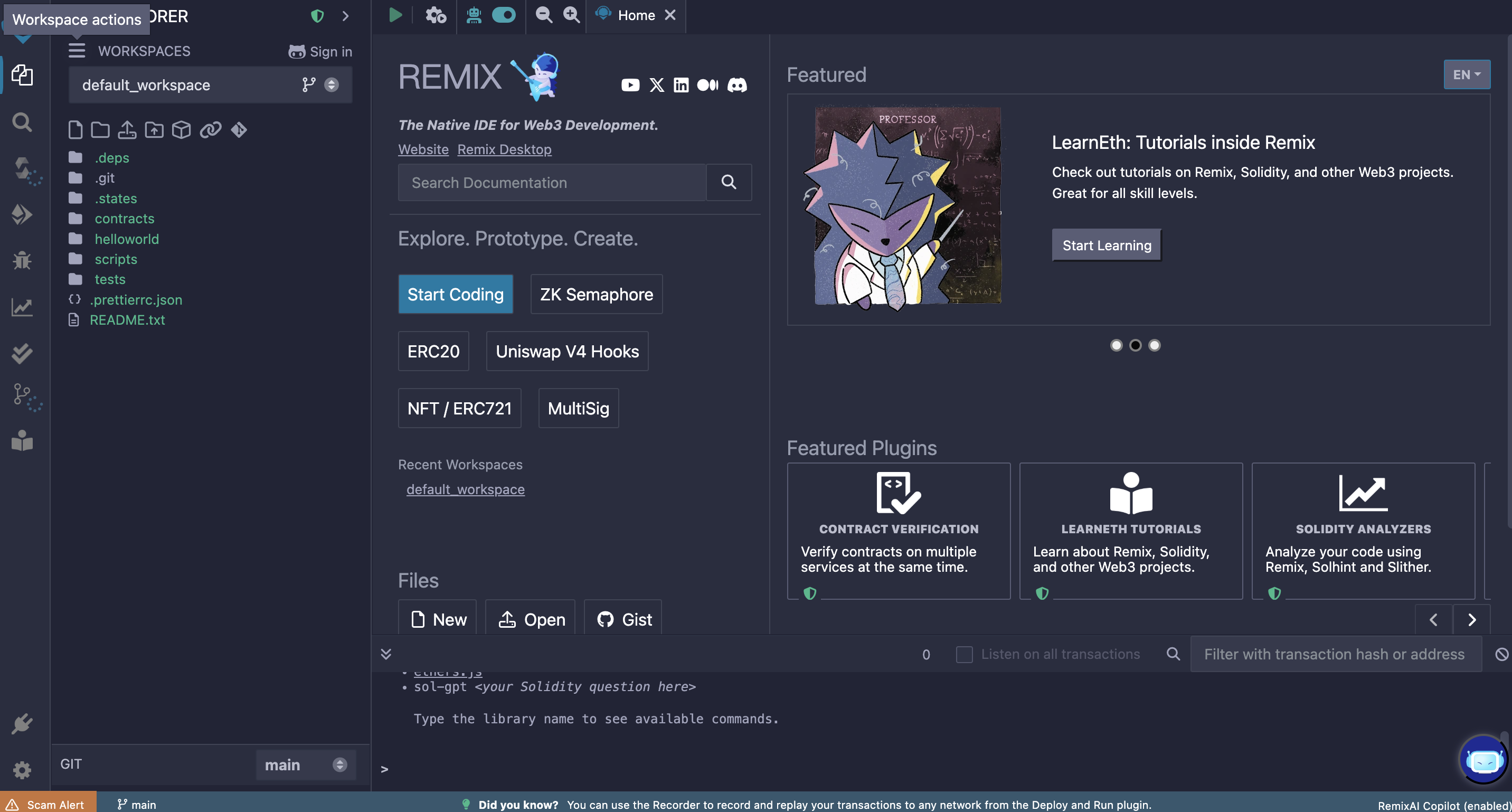
Three areas to know: files, editor, plugins. This is an illustrative reference view; Remix's current interface may differ. Create the contract file
In the file explorer, open the
contractsfolder and create a new file calledGuestbook.sol.Paste in the contract from Part 2:
// SPDX-License-Identifier: MIT
pragma solidity ^0.8.20;

contract Guestbook {
    string public message;
    address public lastVisitor;
    uint256 public visitCount;

    event MessageChanged(address indexed visitor, string newMessage);

    constructor() {
        message = "Hello from Blockchain@NTU";
    }

    function setMessage(string calldata newMessage) external {
        message = newMessage;
        lastVisitor = msg.sender;
        visitCount = visitCount + 1;
        emit MessageChanged(msg.sender, newMessage);
    }

    function getMessage() external view returns (string memory) {
        return message;
    }
}
Personalise it
Change the message in the constructor to something of your own. It is your contract, it will be public forever, and a submission that says
"Hello from Blockchain@NTU"tells your reviewer nothing.Compile
Open the Solidity Compiler tab in the left icon column. Check the compiler version matches your
pragma— 0.8.20 or a later compatible 0.8.x release — then press Compile Guestbook.sol.You should get a green tick on the compiler icon. Warnings do not normally block compilation, but read them before deploying; errors are not and must be fixed before you can deploy.
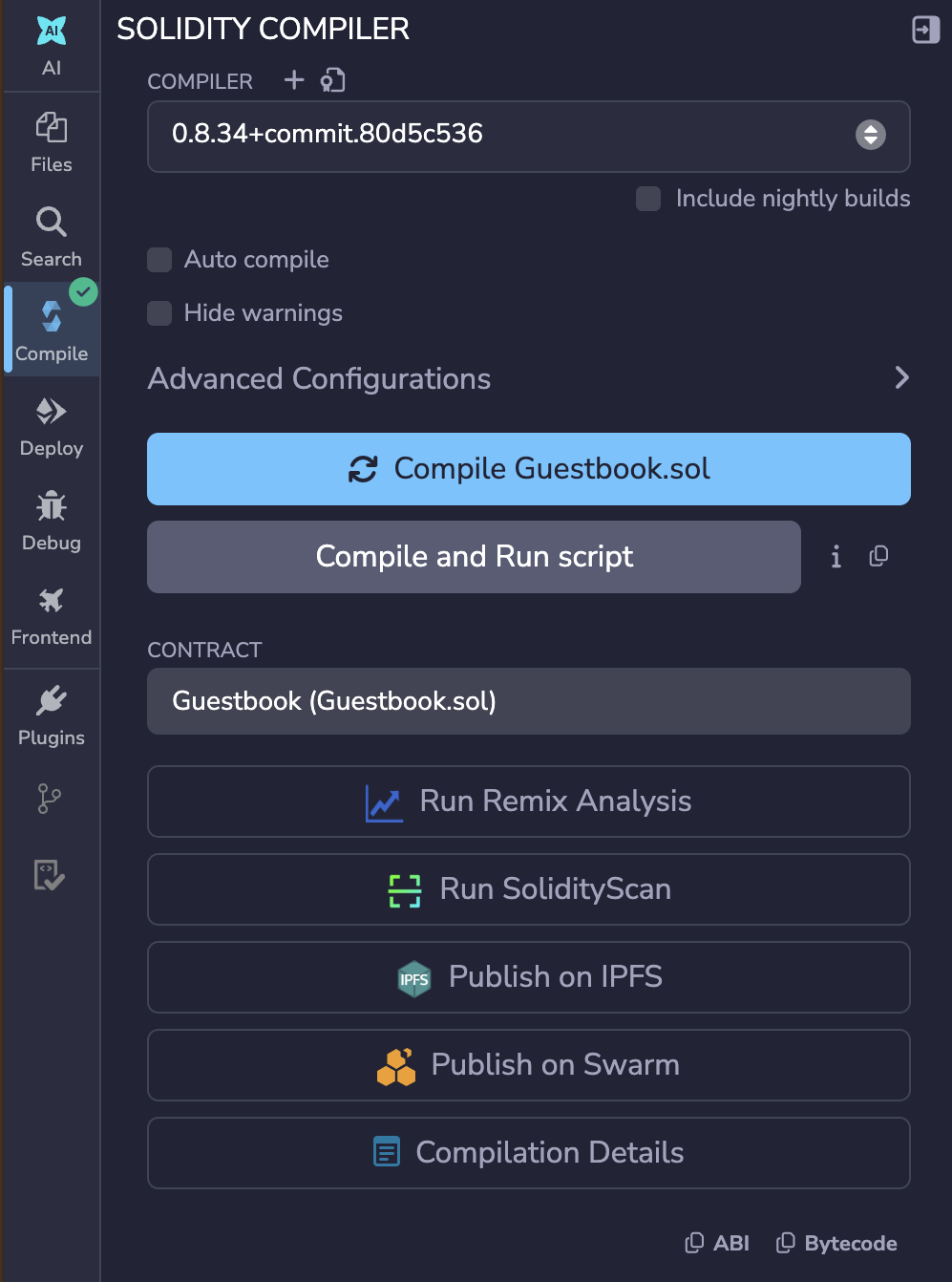
Green tick means it compiled. It does not mean the contract is correct. Connect your wallet
Open the Deploy & Run Transactions tab. In the Environment dropdown, choose Browser Extension, then MetaMask.
The option only appears in a browser that has your wallet
Remix offers this because it can see a wallet extension in the browser you are using. Open Remix in the same browser where MetaMask is installed, or the option will not be listed at all.
Your wallet will ask permission to connect. Approve it.
Check the network before you go further
Remix will show the connected network and your account address. Confirm it says Sepolia, not Ethereum Mainnet.
This is the single most important check on this page. Deploying to mainnet costs real money.
Remix resets to its own simulator when the page reloads
If the page refreshes, Environment silently reverts to Remix VM — a simulated chain inside your browser. Anything deployed there is not on any real network and will never appear on a block explorer.
Two tells, either of which means you are on the simulator:
- the account balance is a round number like 100 ETH rather than your real Sepolia balance
- no MetaMask confirmation appears when you deploy or write
Check the Environment field before every deploy and every write.
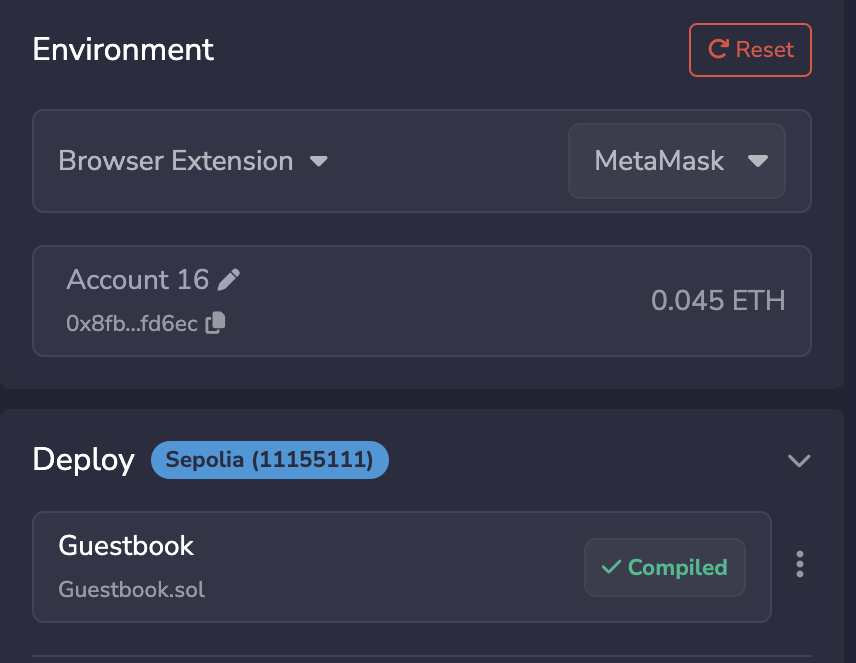
Network first, always. Then account. Deploy
With
Guestbookselected in the contract dropdown, press Deploy.Your wallet opens a confirmation. This is a transaction like any other — read it the way Week 1 Part 7 taught you. Notice the fee is noticeably higher than a plain transfer: you are storing a program on-chain, and Week 2 Part 4 said complexity costs more. Here is that, in practice.
Confirm.
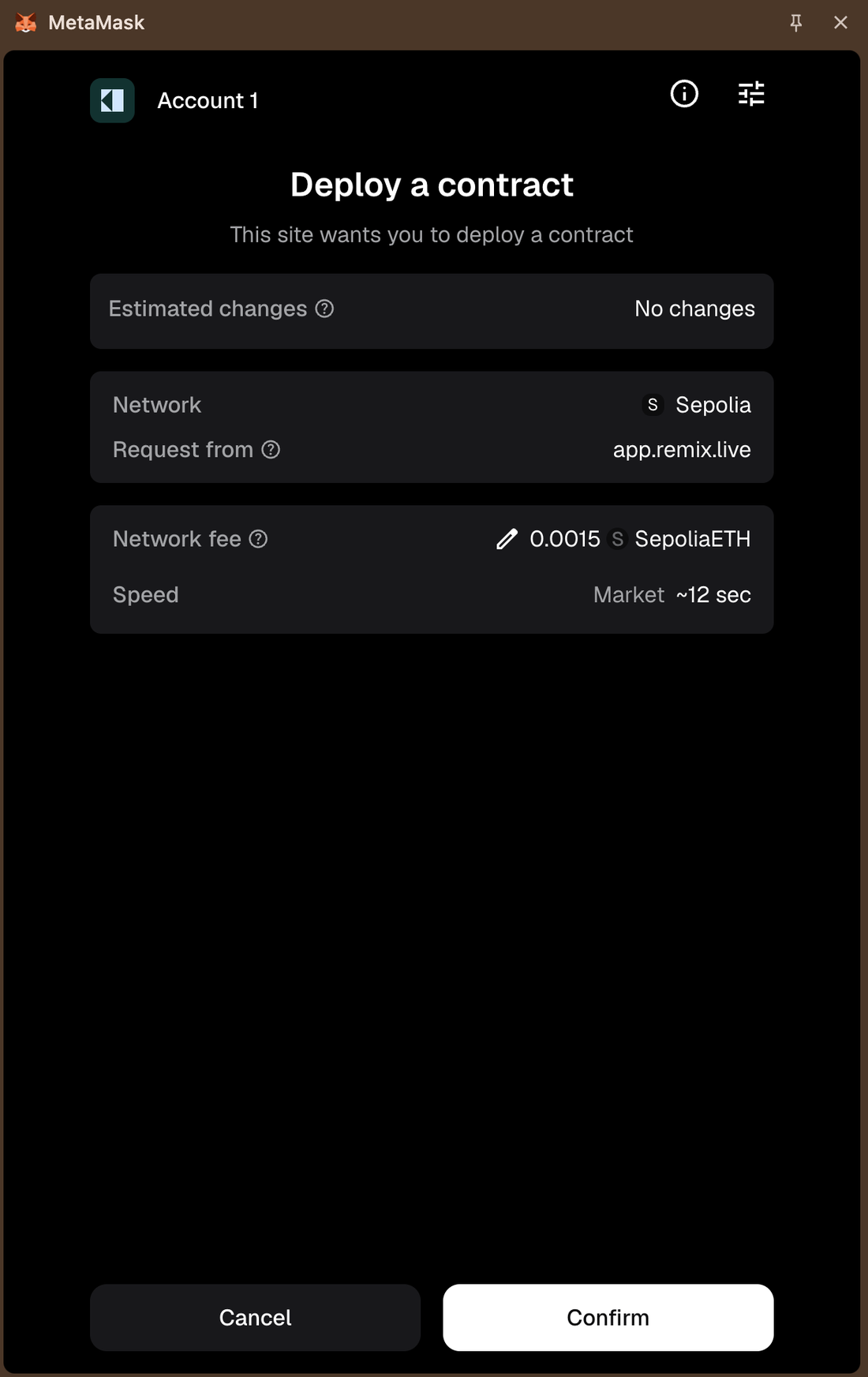
Compare this fee to your Week 1 transfer. That difference is the lesson. After the transaction confirms, the Remix terminal shows a green tick, and your contract appears under Deployed Contracts at the bottom left.
Copy the contract address. You need it for the mission.
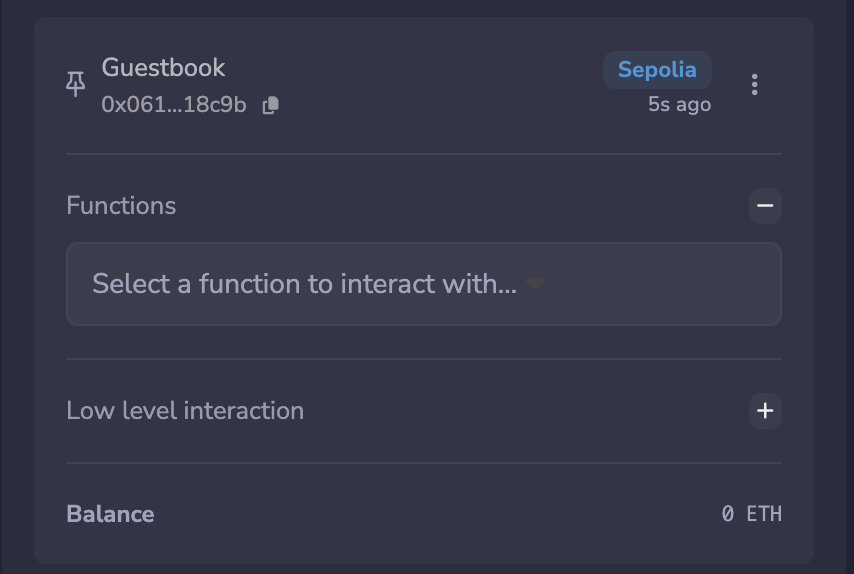
This address is a public deployment recorded on Sepolia while its history is maintained. Call a read function
Expand your deployed contract. You will see buttons for each function.
The read button is blue in the current Remix interface. Press
message.The answer appears immediately, underneath the button. No wallet pop-up and no transaction fee. That is
viewdoing exactly what Part 2 said it would.Call a write function
The orange button is the write function in the current Remix interface. In the field next to
setMessage, type a new message and press it.Your wallet opens again.
For this Sepolia lab only: untick "Added protection"
If MetaMask shows Added protection, untick it so this transaction is sent directly to your
Guestbookand matches the explorer and Anchor Mission flow below. With protection enabled, MetaMask may route the top-level transaction through an additional contract, so the explorer view may differ.This is a controlled Sepolia exercise using a contract you deployed yourself. Do not treat disabling wallet protections as a general habit.
Once it confirms, press
messageagain — the value has changed. PressvisitCount— it has gone up.Copy this transaction hash. You need it for the mission.
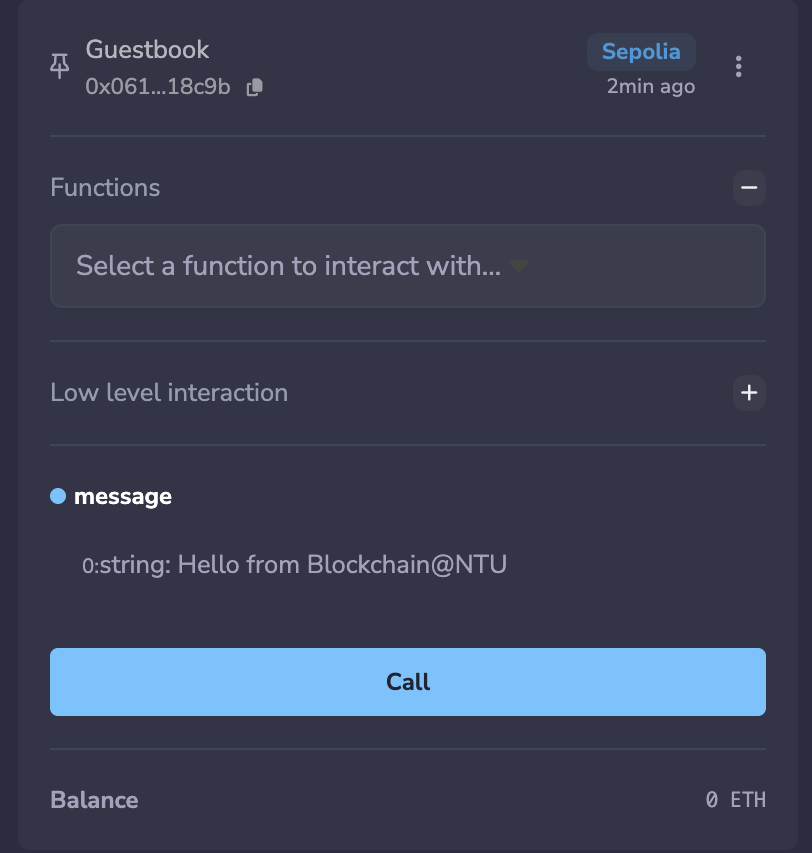
Read calls do not send a transaction. State-changing calls require a signed transaction and gas. You just felt the read/write distinction
One button answered instantly and cost nothing. The other opened your wallet, cost gas, and took a block to take effect. That is not a Remix quirk. It is the difference between asking a node a question and asking the entire network to change its shared state.
Find it on the explorer
Paste your contract address into sepolia.etherscan.io.
You will see the contract, its creation transaction, and every call anyone has made to it — including yours.
Open your
setMessagetransaction and find the Logs tab. The Logs tab may show theMessageChangedevent by name, or lower-level log data if Etherscan does not decode it for you. Either view is the event record from outside the contract.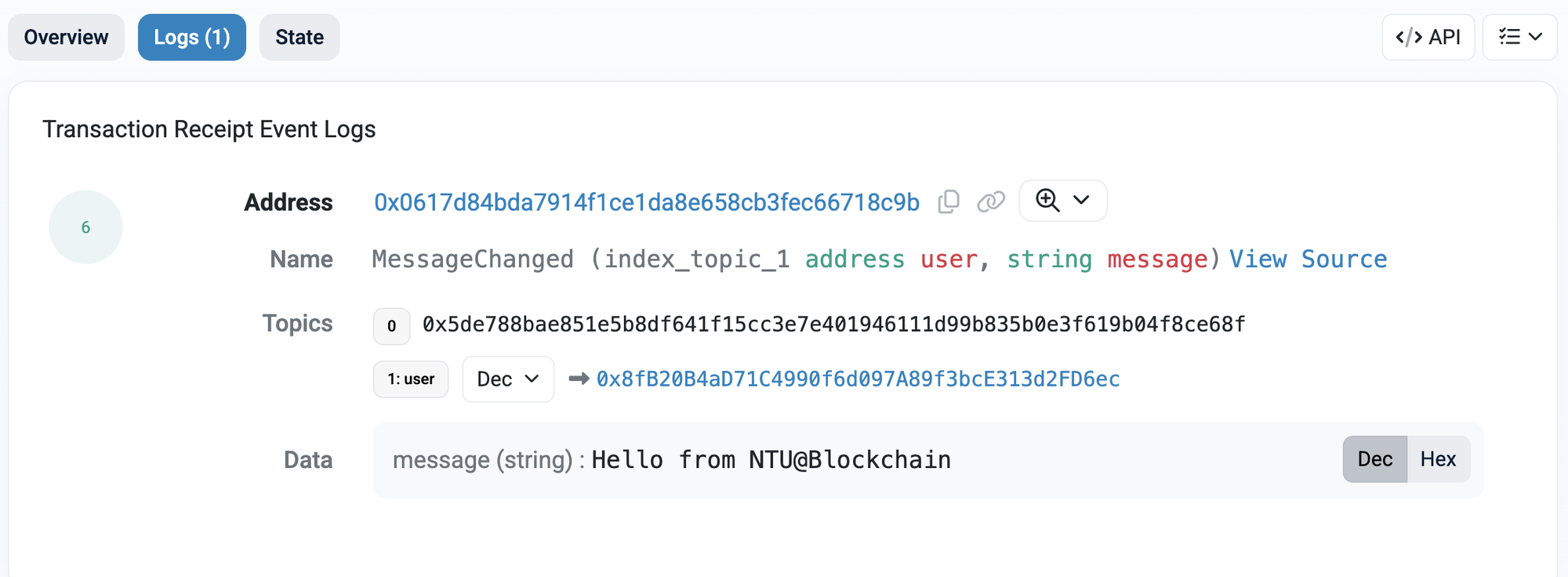
This is what an event looks like from outside. Applications read exactly this.
If something goes wrong
The wallet does not open when I press Deploy
Compilation errors I do not understand
Optional — verify your source on Etherscan
Worked example
What actually happened, in the vocabulary of the last two weeks:
| Step | What happened | Where it was covered |
|---|---|---|
| Compile | Solidity became EVM bytecode plus an ABI | Part 2 |
| Deploy | A transaction with no recipient, carrying code as data | Week 2 Part 4 |
| Address assigned | The network derived an address for the new contract account | Week 2 Part 3 |
Read message | One node answered from its own state copy. Free | Week 2 Part 4 |
Write setMessage | Signed, broadcast, verified by every node, included in a block | Week 1 Part 2 |
| Event emitted | An announcement written to the log for outside applications | Part 2 |
Notice what nobody did
No one approved your deployment. No one reviewed your code. There was no registration, no account, no permission.
You published a program to a public network because you had a key and some test ETH. That is the whole thing — and it is exactly why Part 5 exists.
Further exploration — optional, not assessed
- Remix documentation — the debugger and static analyser are worth an hour if you enjoyed this
- Solidity by Example — deploy two or three more, each a little harder
- Add a
requiretosetMessageso only the deployer can call it, and redeploy. That one line is the most common permission pattern in the industry
Sources and attribution
- Remix IDE — Link, referenced only
- Remix documentation — Link, referenced only
- ethereum.org — Deploy a smart contract — Reuse (CC BY 4.0), adapted
- Sepolia Etherscan — Link, referenced only
- Web3 Internship Handbook — Reuse (permission granted); Remix workspace visual adapted with permission