
GitHub in practice
You made an account and pushed one commit in Week 0 Part 1. This is the working knowledge you need for the Deep Dive and later Proof of Work, where your work lives on GitHub.
GitHub is not only for developers
For the Academy, GitHub is the default home for your Proof of Work. Builders can store code there, while Researchers can publish analysis and evidence. Data/querying and product thinking can support either track; the repository should make the actual output clear.
Learning objectives
- Use repositories, commits, branches, issues and pull requests appropriately
- Trace a small change from an Issue through branch, commit, pull request, review and merge
- Write a README someone can actually follow
- Explain why a licence matters, and choose one
- Explain how to credit sources and AI assistance honestly
Core
The vocabulary, in working order
| Term | What it is | When you use it |
|---|---|---|
| Repository | A project folder with full history | One per project |
| Commit | One saved change, with a message | Every meaningful step |
| Branch | A separate line of work used to make changes without immediately changing the main version | Developing a feature or fix without changing the main line |
| Pull request | A proposed change, opened for review | Contributing, or reviewing your own work |
| Issue | A tracked task, bug or question | Planning, and inviting help |
| Fork | Your own copy of someone else's repo | Contributing to a project you cannot push to |
| README | The front page | The first page people usually read |
Commit messages are documentation
fix stuff tells a future reader nothing. fix: handle empty response from faucet API tells them what changed and why.
You will read your own history in Week 8 when writing up your Proof of Work. Write for that person.
A small repository is a collaboration surface
The repository is more than a folder of files: it is the shared place where people read the project, inspect its history and find the checks that support a change. This is a compact example, not a required template for every Academy project:
Example Proof of Work repository
README.md# front door: what this is and how to use it
LICENSE# how others may reuse the work
.gitignore# files Git should leave out
…
…
check.yml# optional automated checks
The README is usually the first stop. What belongs in src/, docs/ or a notebook depends on the work: sources and evidence may look different for Builder and Researcher outputs. Workflows are useful when a project needs repeatable checks, but not every beginner project needs automated CI.
How people actually collaborate on GitHub
The vocabulary is useful only when you can see how the pieces work together. In a real team, an Issue describes what needs changing, a branch keeps the work separate from the shared version, and a pull request gives other people a place to review the proposed change.
main is the shared accepted version in this simple model. A branch lets you work without changing it immediately. Commits make the work reviewable in small, dated steps. A pull request is not merely “uploading code”: it proposes that one branch be merged into another and keeps the discussion attached to that change.
| Step | What happens | Why teams use it |
|---|---|---|
| Issue | Someone records the context, problem or goal | The team can agree what it is trying to change before editing files |
| Branch | The author creates a separate line such as docs/add-setup-guide | Work can be tested and discussed without changing main |
| Commit | The author saves one meaningful step with a message | Reviewers and future collaborators can see what changed and why |
| Pull request | The branch is proposed for merging into main | The change has one place for its diff, explanation and review |
| Checks | Automated builds or tests run when configured | The team gets repeatable evidence before merging |
| Review and revision | A reviewer comments; the author edits and pushes more commits to the same branch | The PR updates automatically, so the discussion and newest version stay together |
| Merge and sync | An approved PR becomes part of main; collaborators pull the updated version | The shared project moves forward without losing the review history |
Same-repository collaborator or outside contributor?
The review loop is the same; the place where the branch lives differs:
Repository → branch → PR → review → merge
You create the task branch in the shared repository, so the PR can be opened directly against main.
Fork → branch in your fork → PR back to the upstream repository → review → merge
You work in your own copy, then propose the change back to the original project.
You do not need a fork for every contribution. Use one when the repository does not allow you to push branches directly.
What belongs in an Issue?
A useful Issue does not need heavy project management. It usually answers:
- Context: why is this being discussed?
- Problem or goal: what is missing, broken or worth trying?
- Expected outcome: what would count as done?
- Evidence: a link, screenshot, example or reproduction step when relevant
- Environment: browser, operating system, network or version information when it affects the problem
An Issue answers “What are we trying to change?” A PR answers “Here is the proposed change.” Linking the two keeps the original goal visible while the implementation is reviewed.
A complete example: missing setup instructions
Imagine the README does not explain how to run a project locally:
- Open an Issue titled Add local setup instructions. Describe the missing steps and say that the definition of done is a new reader being able to run the project from a clean machine.
- Create the branch
docs/add-setup-guidefrommain. - Edit the README and test the instructions on a clean setup if possible.
- Commit the focused change as
docs: add local setup instructions. - Push the branch and open a PR. Explain what changed, why, and how you checked it.
- A reviewer comments: Please clarify the Node version.
- Edit the README and push another commit to the same branch. The PR updates automatically; you do not open a second PR.
- The checks pass, the reviewer approves, and the PR is squash-merged according to the repository's convention.
- The branch is deleted, and
mainnow contains the accepted instructions. - Anyone continuing the work syncs their local copy with the updated
main.
The point is the collaboration loop, not the number of Git commands. Review comments are part of the work, not a private judgement about the person who wrote it.
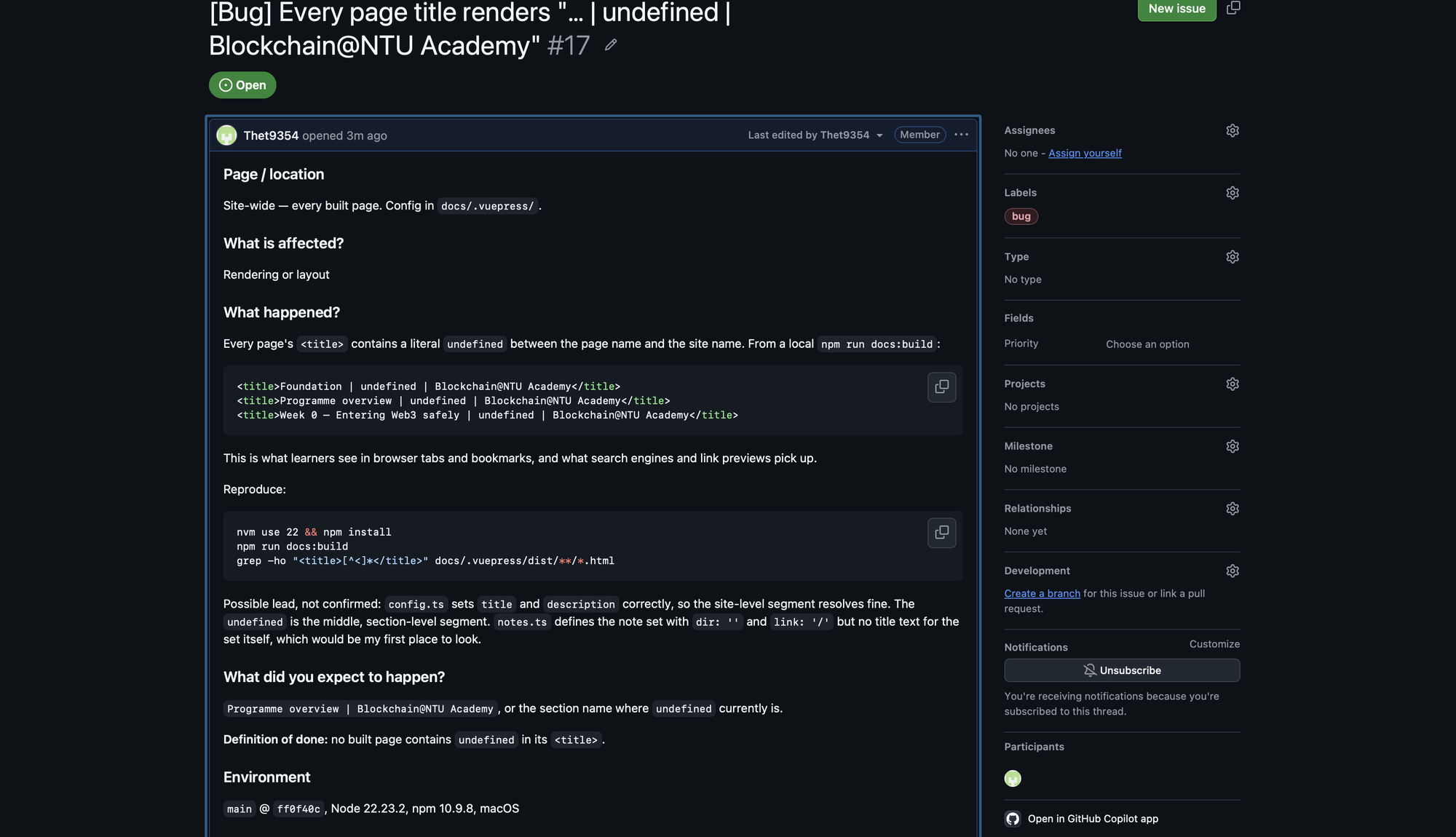
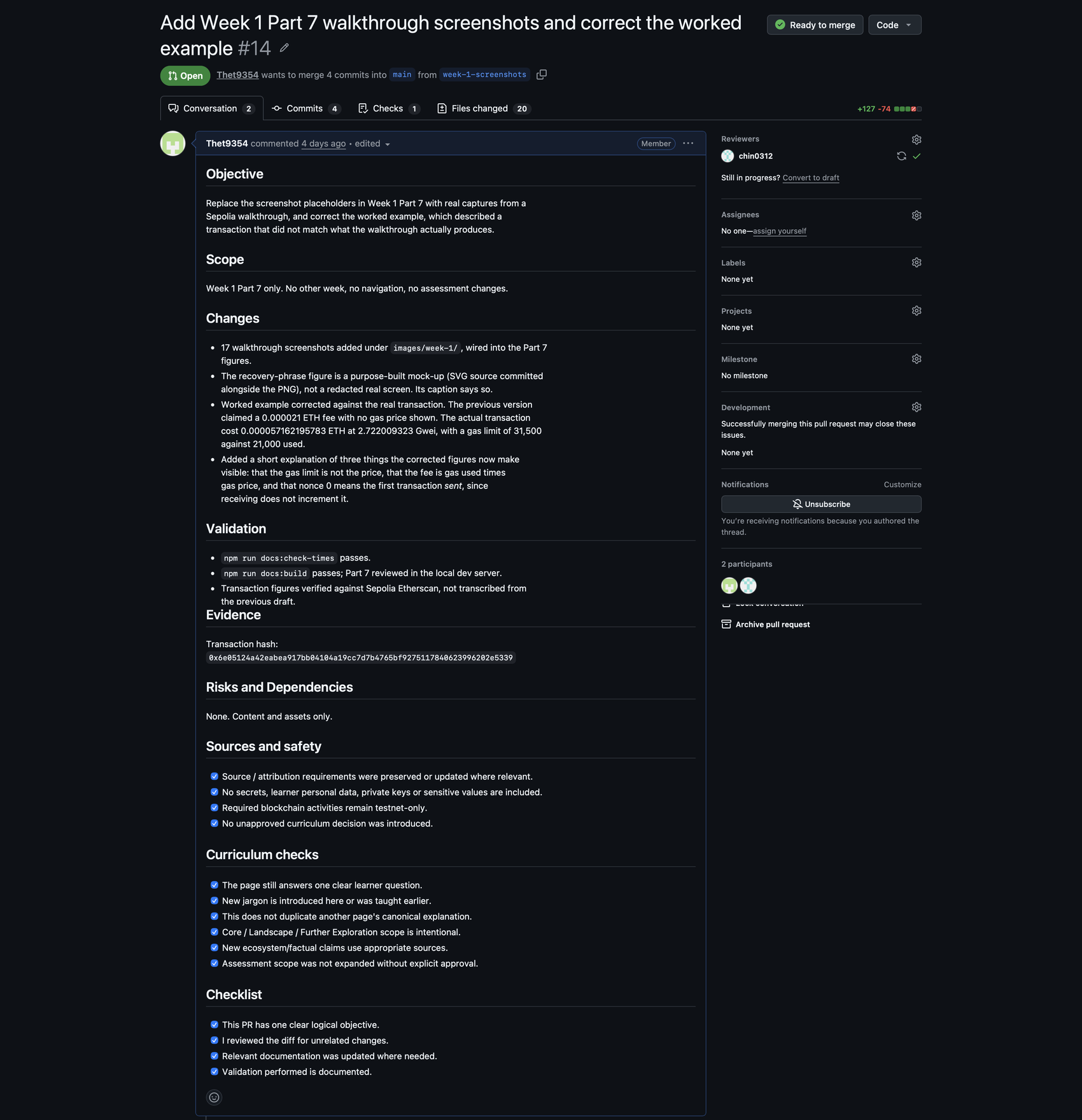
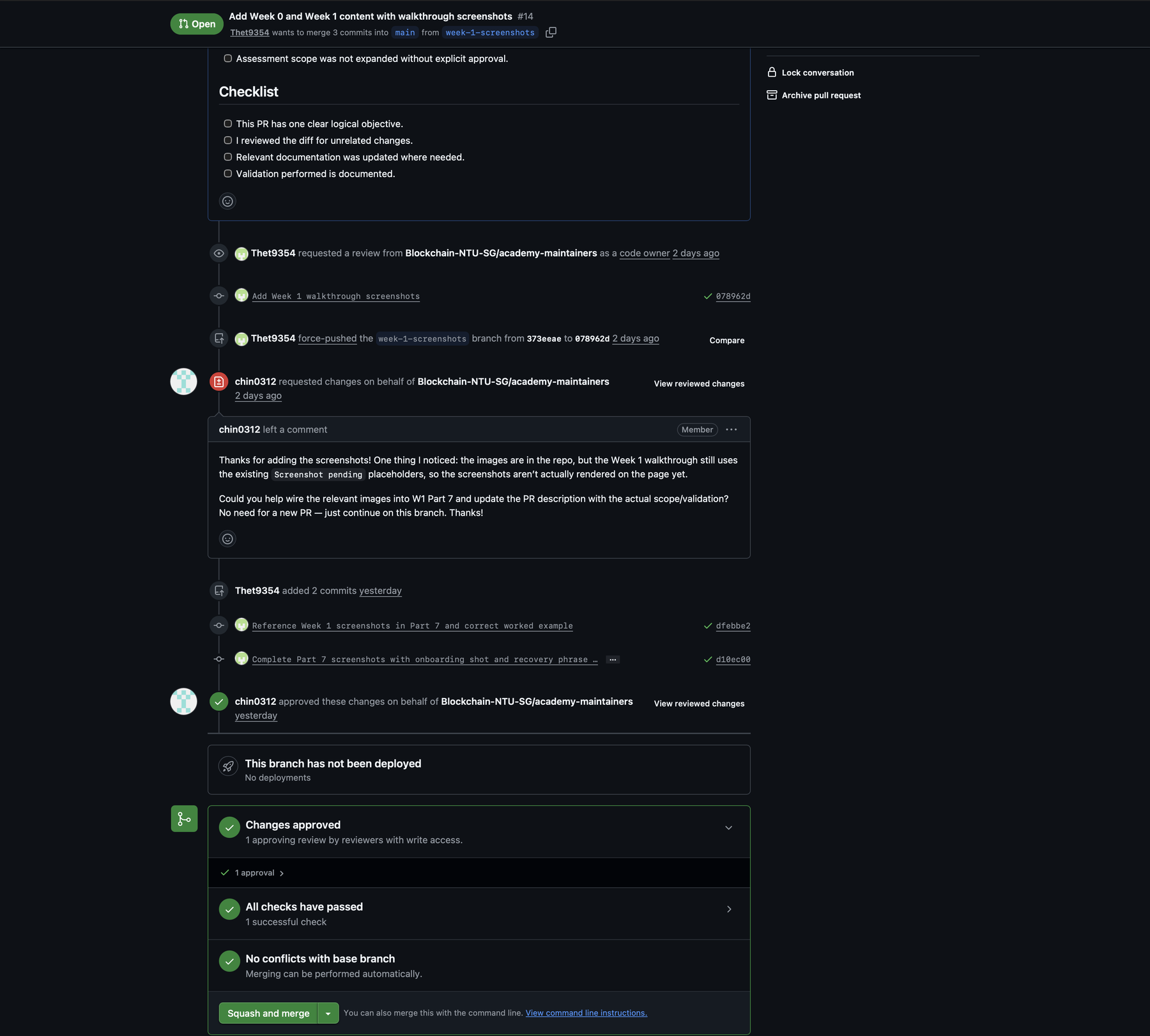
Commit messages: small labels for future readers
The exact prefix is a convention, not GitHub law. The useful property is that a future collaborator can understand the change without opening every file.
| Prefix | Common meaning | Example |
|---|---|---|
feat: | New functionality | feat: add wallet balance view |
fix: | Bug fix | fix: handle empty faucet response |
docs: | Documentation | docs: add local setup instructions |
test: | Tests | test: cover invalid address input |
refactor: | Internal restructuring without changing intended behaviour | refactor: split search helpers |
chore: | Maintenance | chore: update build script |
Code review: what a useful PR tells a reviewer
A small PR normally answers:
- What changed?
- Why was it needed?
- How was it tested or checked?
- What might be affected?
- Is there anything that deserves special attention?
Small, focused PRs are easier to review than one giant change that mixes unrelated fixes. A reviewer may ask whether the change solves the stated problem, introduces another issue, has understandable reasoning, passes its checks, updates the documentation and avoids secrets or security risks.
The social loop is simple:
Comment → author revises → push → PR updates → reviewer re-checksKeep important technical discussion in the Issue or PR rather than moving it to private DMs. Disagreement is normal. Review comments are part of the work, not judgement about the person. Respond to the substance of a comment, explain a different decision when needed, and review the change rather than the person. Do not resolve a thread without addressing or explaining the issue.
Optional command-line equivalent — not assessed
git switch main
git pull
git switch -c docs/add-setup-guide

# edit files

git add README.md
git commit -m "docs: add local setup instructions"
git push -u origin docs/add-setup-guide
The Issue, PR, review, checks and merge normally happen on GitHub. You can use the website, GitHub Desktop or the command line; the collaboration model is the same.
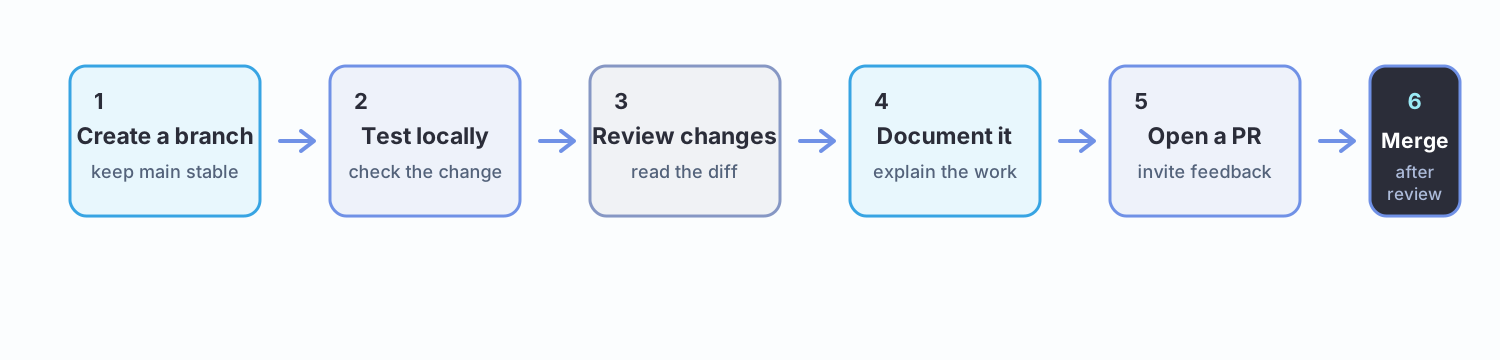
The README is the front door to the deliverable
Most people spend weeks building and ten minutes on the README. Reviewers, employers and collaborators read the README and often nothing else.
Project name
One sentence: what this is and who it is for.
The problem
Two or three sentences. What is broken or missing?
What this does
What it actually does today — not what you plan.
How to view, reproduce or use it
Explain how someone can access, reproduce, run, or inspect the work. For code, include setup/run steps. For research, data, or product work, explain how to view or reproduce the output.
How to run it (if applicable)
For code or another runnable component, give numbered steps someone else can follow on a clean machine. Remove this section when it does not apply.
What I learned
The part reviewers actually care about.
Limitations and next steps
What does not work yet, and what you would do next.
Sources and AI assistance
What you used, and where it came from.
README source → rendered result
See how Markdown becomes a readable project front door.
A README that works
The demo above turns the source into the front door a reviewer reads. Keep the sections that fit your direction, but make the work understandable and checkable without a private explanation.
Two sections carry disproportionate weight.
Limitations signals judgement. A project claiming no weaknesses reads as either dishonest or unexamined. Naming yours is the strongest signal in the document.
Access and reproduction steps are where most fail. Instructions that work on your machine because of something you set up months ago and forgot are not reproducible instructions. Test them somewhere clean.
A direction-neutral delivery check
Before you share a repository, a reviewer should be able to answer four simple questions:
- What is this, and what problem or question does it address?
- How can someone view, reproduce, run, or inspect the output?
- What evidence shows what you did or found?
- What are the limits, sources, and any important AI assistance?
The evidence can look different across the two tracks: a built output, a research argument, a dataset or query, or a product walkthrough. The standard is still the same — make the work understandable and checkable.
Licences
No licence means "all rights reserved"
Public code with no licence is not open source. Legally, nobody may use, modify or distribute it. Most people assume the opposite.
| Licence | Roughly |
|---|---|
| MIT | A common permissive software licence; reuse is allowed if the notice is kept |
| Apache 2.0 | Like MIT, plus explicit patent terms |
| GPL-3.0 | Derivatives must also be GPL |
| CC BY 4.0 | For writing and documentation, not code |
For a simple software or code project, MIT is a common, simple default. Written research and documentation may need a content-appropriate licence such as Creative Commons. Choose a licence that matches what you are publishing; choosealicense.com walks you through software options in two minutes.
Note the split this handbook itself uses — code under one licence, written content under another. Week 0 Part 3 touched on this: a repository badge saying MIT usually refers to the code, not the articles.
Attribution, honestly
You will build on other people's work. That is normal and expected. What matters is being straightforward about it.
| Situation | What to do |
|---|---|
| Used a library | Standard — respect its licence |
| Adapted someone's code | Credit them and link the source |
| Followed a tutorial | Say so. Nobody minds |
| Forked and modified | GitHub shows this automatically. Explain what you changed |
| Used AI substantially | Say what it produced — see Part 5 |
The Academy's position
Using AI, tutorials and other people's code is expected, not penalised.
The reviewer standard is not "did you write every line". It is "can you explain what a piece of your submission does, and what would break if it changed?"
Copying without understanding fails that test. Copying with understanding, and saying so, is just how software gets built.
Landscape
.gitignore— files Git should not track, such as local secrets or build output. It helps prevent accidental commits, but does not remove a secret already in history- GitHub Actions — automation on a push or pull request. This handbook uses it to check that every PR builds before review
- Branch conventions — teams may use
mainwithfeat/*,fix/*anddocs/*branches, or adddevelop, release branches or a trunk-based workflow. Repository convention wins; no single layout is universal - Merge methods — merge commit, squash and merge, and rebase and merge are different ways to combine a PR. Small projects often prefer squash and merge for one clean final commit, but follow the repository's convention
- GitHub Pages — free static hosting for a project site. A published page is useful evidence, but it does not replace the repository's source
- Releases and tags — labels marking a version. They help someone return to the exact state behind a result
- Gist — a single-file snippet for sharing something small. It is useful for a short example, not a substitute for a maintained project repository
- Stars, forks, watchers — weak popularity signals. They show attention or reuse; commit history and working output say more about the work
- CODEOWNERS — a file saying who must review changes to which paths. It guides review, but does not make the code correct
Never commit secrets
Private keys, API keys, .env files, recovery phrases.
Deleting a secret in a later commit does not make it safe. Copies may already exist in earlier history or clones. Assume anything committed to a public repo is public.
If it happens: rotate the key immediately. Treat it as compromised, because it is.
Worked example
Two repositories from the same Proof of Work milestone sequence. Same amount of work.
A repository with no orientation
main.py
test.py
notes.txt
- README: none, or one line
- Commits:
update,update,fix,asdf - Licence: none
- No indication of what it does or how to run it
A reviewer cannot tell what it is, whether it works, or what the member learned. The work may be excellent — it is unreadable, so it cannot count for anything.
A reviewable repository
README.md
LICENSE
.gitignore
src
data
screenshots
- README: problem, what it does, how to run it, what was learned, limitations, sources
- Commits:
feat: add gas price fetcher,docs: add setup steps,fix: handle API timeout - Licence: MIT
- Screenshots showing it running
A reviewer understands it in two minutes without asking a question. So does anyone else who finds it later.
The difference is about an hour of work
And it is the difference between something that counts as Proof of Work and something that does not.
Your GitHub profile is the most durable thing you take out of this programme. Week 8 will ask you to ship the second version — start building the habits now.
Further exploration — optional, not assessed
- GitHub Skills — short interactive courses; "Introduction to GitHub" takes about 20 minutes
- GitHub Docs — GitHub flow — the lightweight branch-based workflow
- GitHub Docs — About pull requests — proposing, discussing and merging changes
- GitHub Docs — About issues — tracking ideas, bugs and work
- GitHub Docs — Pull request reviews — comments, approvals and requested changes
- Choose a License — two minutes, and settles the question
- Find a Web3 project you use and read its repository. Notice the README structure, the issue templates, and how contributions are reviewed
Sources and attribution
- GitHub Docs — About repositories — Reuse (CC BY 4.0), adapted
- GitHub Docs — About pull requests — Reuse (CC BY 4.0), adapted
- GitHub Docs — About READMEs — Reuse (CC BY 4.0), adapted
- GitHub Docs — GitHub flow — Reuse (CC BY 4.0), adapted
- GitHub Docs — About issues — Reuse (CC BY 4.0), adapted
- GitHub Docs — Pull request reviews — Reuse (CC BY 4.0), adapted
- GitHub Skills — Introduction to GitHub — Link, referenced only
- Choose a License — Link, referenced only
- Web3 Internship Handbook — Reuse (permission granted); GitHub workflow visual adapted with permission