
Staying safe: what you can lose and how
This is the most important page in Week 0
Everything else you learn here is recoverable. Misunderstand consensus and you read another explanation. Misunderstand a signature request and the loss is permanent — no support line, no chargeback, no reversal.
The property that makes blockchains useful — nobody can undo a valid transaction — is exactly the property that makes mistakes final.
The good news: the attacks are boring. Almost nobody loses assets to sophisticated cryptography being broken. They lose them to a fake website, a signature they did not read, or a message from someone pretending to be helpful.
Learning objectives
- List what is actually at risk, and which losses are permanent
- Recognise the common attack patterns before they reach the point of decision
- Explain why signing a message can be as dangerous as sending funds
- Apply the testnet-only and no-keys rules without needing to be reminded
Core
A threat model in three questions
What can I lose
| Asset | Recoverable? |
|---|---|
| Lost access — your seed phrase or private key is gone and no valid backup exists | No support desk can restore access |
| Compromised secret — your seed phrase or private key was exposed | The secret cannot be made private again; move assets and usage to a fresh wallet |
| Funds — assets in a wallet you control | Never, once a valid transaction confirms |
| Identity — the reputation tied to your address | Hard. Your address history is permanent and public |
| Accounts and devices — email, GitHub, Telegram, your machine | Usually, with effort. But they are the route to everything above |
Two things follow from that table
Your seed phrase is not like a password — a password can be reset, and this cannot.
And securing your email and your laptop is Web3 security, because that is how attackers reach the rest.
How people actually lose things
The seed phrase is 12 or 24 words that regenerate your entire wallet. Anyone holding it holds your assets, from anywhere, forever.
It leaks in unremarkable ways: typed into a fake "wallet validation" page, saved in a screenshot or cloud note, pasted into a chat, or entered into a "support tool".
No one should ask for your recovery phrase
No website, DApp, support agent, reviewer or other person should ever ask for your recovery phrase. Not to help you, not to verify you, not to fix a stuck transaction.
The normal exception is when you deliberately restore or import your wallet into wallet software that you installed from a verified official source. Never enter it because someone sent you a link, DMed you, or told you to “verify”, “sync” or “unlock” your wallet.
A near-perfect copy of a real site, reached through a sponsored search result, a Discord link, a reply to a support post, or a lookalike domain. The site works exactly as expected until the moment you approve something.
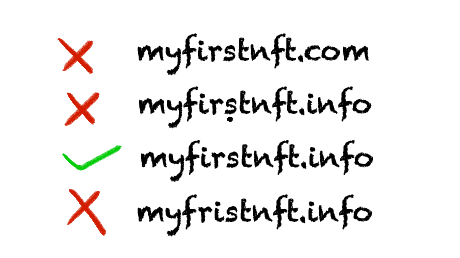
Fake contracts are the same idea one layer down: an application that looks real but whose contract does something other than advertised. Verified source code on a block explorer is one check — it is not proof of good intent.
This is the one beginners never see coming.
You can lose assets without sending a transaction. Some signature requests are not payments — they are permissions. Sign the wrong one and you have authorised someone to move your tokens later, at a time of their choosing.
There is no visible loss at the moment you sign. Week 3 covers the mechanics; for now, know that "just signing a message" is not automatically safe.
Unlimited approvals. When you let an application spend a token, many request an unlimited allowance for convenience. That permission persists indefinitely. If that contract is compromised months after you last used it, the allowance is still live. Old approvals are a standing liability.
Malware. Clipboard hijackers that swap a copied address for the attacker's. Fake wallet extensions in browser stores. Cracked software.
Wrong address or network. Send to a mistyped address and it is gone. Sending on the wrong network can make assets hard to find or require recovery steps. Some mistakes are recoverable when the same address exists on another EVM network; others can result in permanent loss.
The most effective of all, and the one that does not look technical. A helpful stranger in a group chat. A "team member" who DMs first. A job offer with a test file. An urgent deadline on a free airdrop.
Notice the shared ingredient
Urgency plus helpfulness. Real support does not DM you first, does not rush you, and does not need your keys. Anything combining those three is an attack, regardless of how convincing the profile picture is.
Basic defence
| Habit | Why |
|---|---|
| Verify the URL every time | Bookmark the real site and use the bookmark. Never reach a wallet or protocol through a search ad, a DM, or a forwarded link |
| Never share keys | No exceptions. Nobody needs them |
| Read before signing | Which network, which contract, which token, how much, what permission. If the wallet cannot explain it plainly, reject it |
| Use testnet for transactions and wallet actions | Any activity that sends a transaction, deploys a contract, performs a state-changing wallet action, or otherwise requires funds or an on-chain signature must use testnet only. Read-only inspection of public mainnet data is allowed when a lesson explicitly asks for it |
| Separate wallets | One for learning. A different one for anything you would mind losing. They should share nothing |
| Turn on 2FA | Email, GitHub, exchange accounts. An authenticator app, not SMS |
| Review approvals | Periodically revoke old allowances at revoke.cash |
| Write the seed phrase on paper | Offline. Not a screenshot, not a cloud note |
The Academy's rules
These hold throughout the Academy and have no exceptions
1. Testnet only for transactions and wallet actions. Any Academy activity that sends a transaction, deploys a contract, performs a state-changing wallet action, or otherwise requires funds or an on-chain signature must use testnet only. Some lessons may ask you to inspect public mainnet data in a block explorer without connecting a wallet or sending anything. Testnet coins are free and worth nothing. No Academy mission will ever require real money or a wallet holding real assets.
2. Nobody asks for your keys. No reviewer, organiser or committee member will ever ask for your seed phrase or private key. Anyone who asks is an impersonator, regardless of what their profile says.
If a submission ever seems to require real money, stop and ask. You are not missing something — either we made an error, or the instruction is not from us.
Landscape
- Hardware wallet — a device keeping keys offline. It reduces online exposure, but safe setup and backups still matter; it is not needed for testnet work
- Multisig — a wallet requiring several signers. It reduces reliance on one key, but losing enough signers can block an action
- Smart contract audit — a paid security review of a defined scope. It can find issues, but audited protocols still get exploited
- Blind signing — approving a request your wallet cannot explain clearly. You may authorise a dangerous action without recognising it
- Address poisoning — an attacker sends dust from an address resembling one you use, hoping you copy it from your history later and send funds to the wrong address
- Rug pull — a project's own team removing value, changing the rules or abandoning it. Users may be left with tokens they cannot use or sell
Guided walkthrough
No wallet yet — that is Week 1. Do the account hardening now instead.
Turn on 2FA
For your email, GitHub, and any exchange account, using an authenticator app rather than SMS. Each should now prompt for a code at login. Your email is the recovery path for everything else, so it matters most.
Bookmark the real sites
metamask.io, etherscan.io, remix.ethereum.org. Reach them only through these bookmarks from now on.
Decide where your seed phrase will live
Before Week 1 creates one. Paper, offline, somewhere you will not lose it. Decide now, while nothing is at stake.
Practise the pause
Before approving anything in a wallet, ask: which network, which contract, what am I actually authorising? Building the habit on testnet, where errors are free, is the entire point of doing this on testnet.
Worked example
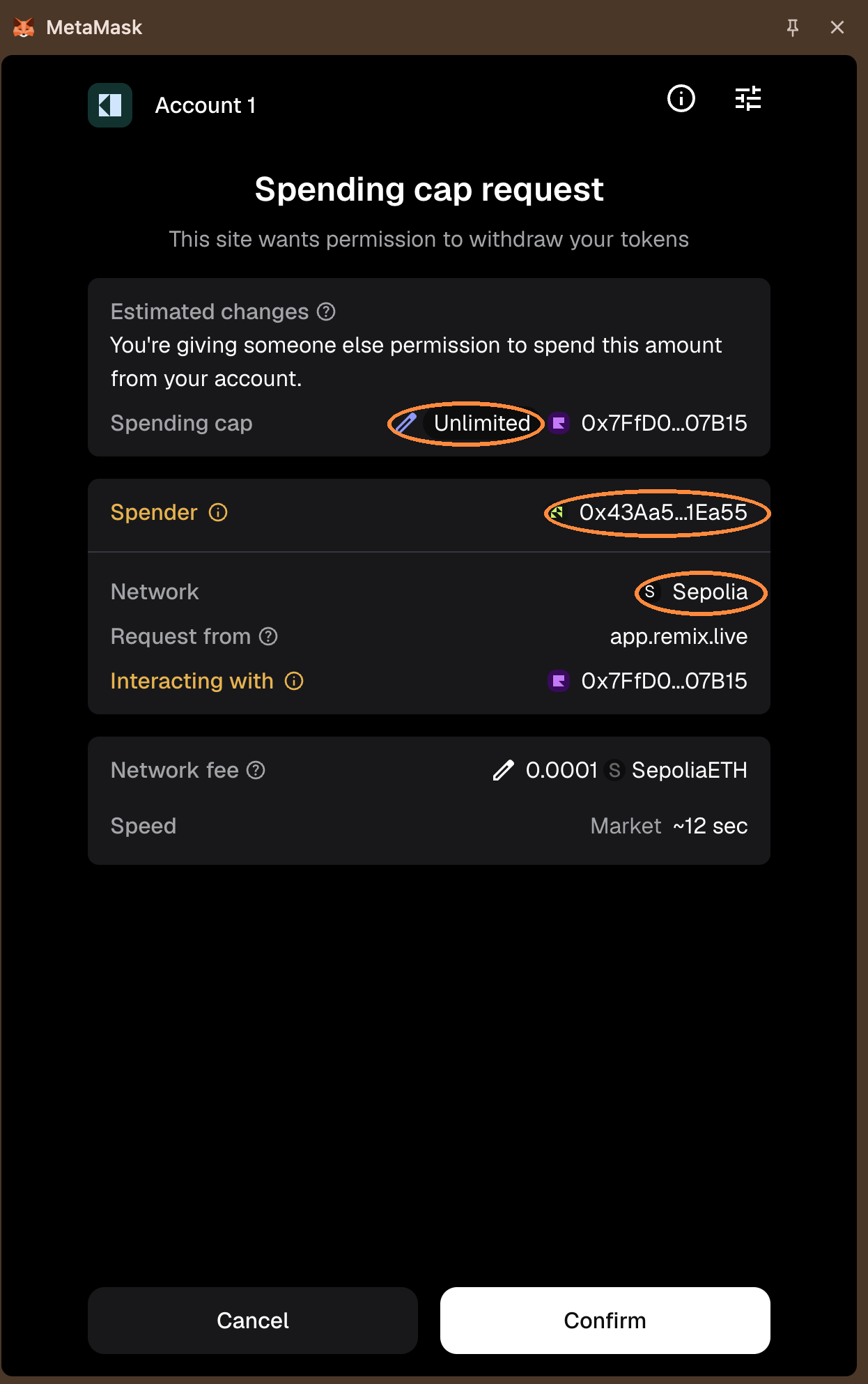
Two requests. One is a payment. One is a permission. Both arrive as a wallet pop-up.
Send 0.05 ETH to
0x742d…f44eon Ethereum Mainnet. Estimated fee: 0.0012 ETH.
Bounded. Worst case, you lose 0.05 ETH plus the fee.
Check the network, check the address character by character against your source, confirm.
Allow
0x9c8a…21b7to spend your USDC. Amount: Unlimited.
Nothing moves when you sign. No funds leave. Nothing appears to happen.
You have granted permission to move all your USDC, at any point in the future. If that contract is malicious, your balance is gone in the next block. If it is honest but compromised in six months, your balance is gone then — and you will have forgotten this moment entirely.
Permissions like this arrive two ways, and both matter:
| Permission type | What it looks like |
|---|---|
| On-chain approval | A transaction. Costs gas. Sets an allowance on-chain |
| Signature-based permission | Often no gas at all. Someone else submits it later |
The second one can feel harmless precisely because it costs nothing.
Request B is the more dangerous one, and it looks like nothing happened
That is the entire lesson of this page.
"No gas" does not mean "safe." Cost is not the signal. What you are authorising is the signal.
The defence: set a spending cap instead of unlimited where the wallet allows it, and revoke permissions you no longer use.
Further exploration — optional, not assessed
- ethereum.org — Security — a fuller treatment of the same threats
- Revoke.cash — inspect and revoke token approvals. Worth looking at before you have any to revoke
- MetaMask support — security basics — wallet-specific guidance from the vendor
- Web3 Internship Handbook — Security — a broader reference on wallet and application risks; jurisdiction-specific material is outside this handbook's scope
Sources and attribution
- ethereum.org — Security — Reuse (CC BY 4.0), adapted
- ethereum.org — Smart contract security — Reuse (CC BY 4.0), adapted
- MyFirstNFT — Reuse (permission granted, LXDAO); phishing visual
- MetaMask — Support — Link, referenced only
- Revoke.cash — Link, referenced only
- Web3 Internship Handbook — Security — Link, reference only; no jurisdiction-specific material reused